Get started with the GraphQL API
Introduction
Traide is powered by a GraphQL API service, a query language for client-server communication. The service is web-based, with a single URL endpoint to interact with your store's underlying data. Our API provides access to both public and private data.
GraphQL uses a set structure to organize data, known as a type system. Think of it like a blueprint that outlines the following information:
- Types: What kinds of data you can access
- Fields: What kinds of details are within each type data
- Operations: What you can do with the data, either:
- Queries: Retrieve data
- Mutations: Change data
The core of any GraphQL operation is to retrieve or change objects and their fields. For example, here's a shop type query to fetch the name field:
{
  shop {
    name
  }
}
{
  "data": {
    "shop": {
      "name": "My Example Store"
    }
  }
}
The query is constructed as follows:
- We start with the root object
- We select the
shopfield - For the object returned by
shop, we request thenamefield
Why GraphQL
GraphQL offers a flexible alternative to REST APIs. With REST, each request requires a call to a different endpoint. With GraphQL, all requests use a single HTTP endpoint, allowing you to request exactly the data you need from the server.
While REST sends and returns a fixed set of data for each endpoint, GraphQL lets you specify exactly what data you want, meaning you can avoid over and under-fetching data. GraphQL also has the benefit of allowing you to easily traverse object relationships to return a wide range of data.
To learn more about GraphQL language and its concepts, see the official GraphQL website.
Access Traide's GraphQL API
With GraphQL, all requests made are sent to a single HTTP endpoint. The API endpoint is available at /graphql/, and can be accessed for both single and multiple tenant accounts.
Single tenant accounts
If your account is a single tenant account, you can access the API via the following endpoint:
https://api-{your_domain}.com/graphql/
For example, if your account's domain is mystore.mpconsole.com, you can access the API via https://api-mystore.mpconsole.com/graphql/.
mpconsole represents Traide's centralized domain for all marketplace accounts.
Multiple tenant accounts
If your account is a multiple tenant account, you can access the API via the following endpoints:
- Production:
https://api.mpconsole.com/graphql/ - Staging:
https://api.mpconsole.dev/graphql/
When making requests from a multi-tenant account, ensure you include your account's subdomain in the request header for authorization, using the following format:
{
  "x-nautical-tenant": "{your-subdomain}"
}
For example, if your account domain is mystore.mpconsole.com, your authorization header should be formatted as follows:
{
  "x-nautical-tenant": "mystore"
}
You must send API calls using the HTTP POST method and the application/json content type.
By default, new accounts are provisioned as multiple tenant. If you're uncertain about the tenant type associated with your account, please contact support for verification.
GraphQL playground
Traide exposes an interactive GraphQL editor, allowing access to the API from your browser. Simply point your browser address to your API endpoint to go to the GraphQL playground.
Your GraphQL playground is an external interactive editor for your GraphQL queries and mutations. It loads the schema as you write queries and mutations to help you know which fields are available on each type.
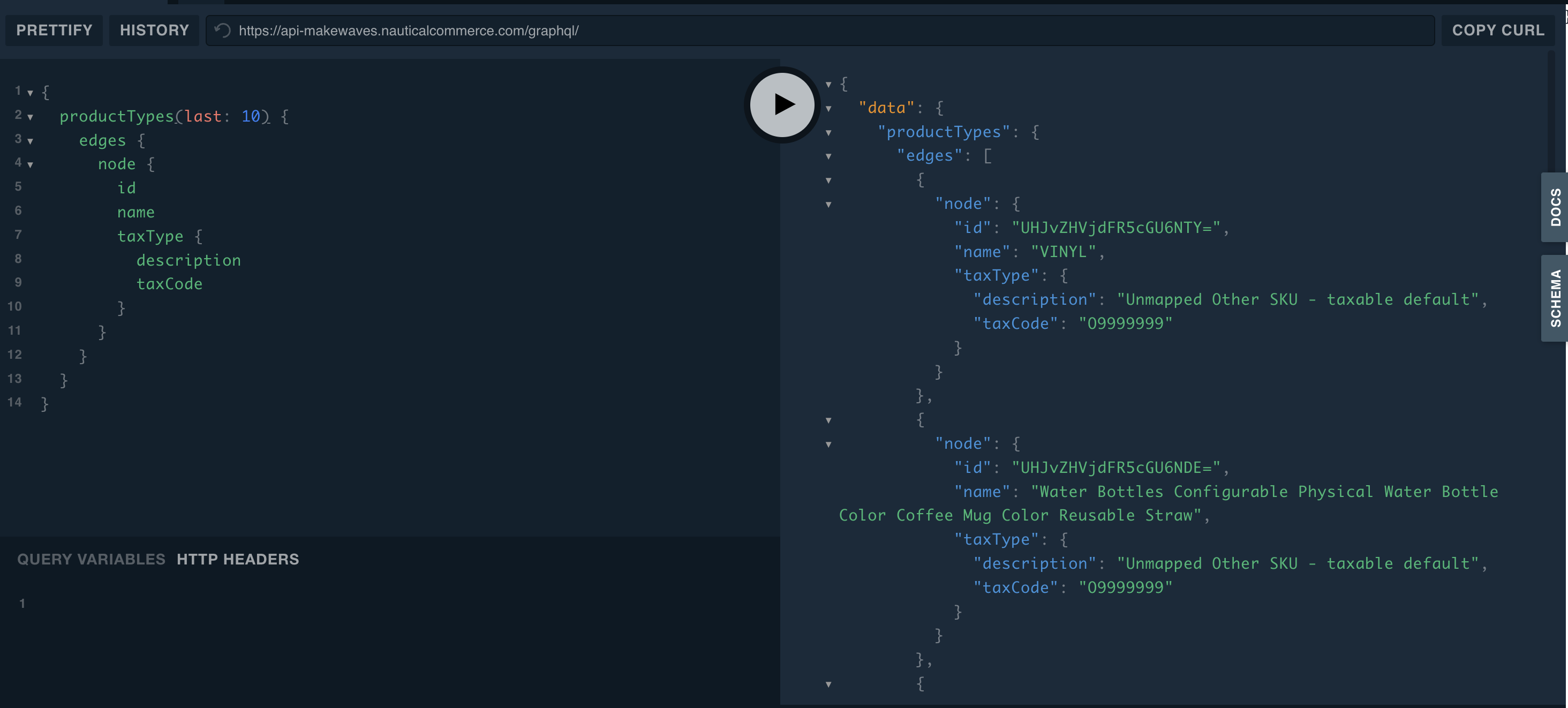
In your GraphQL playground, open the Docs tab to view all supported queries and mutations, see what they require, and see what data they can return.
For more information, visit the Playground GitHub page.
Queries and mutations
There are two operation types with GraphQL: queries and mutations. Both help you interact with a server to manage your data. Queries read data from the server, while mutations change the data. Think of queries as asking questions and mutations as giving commands.
Before running any query or mutation you send, the GraphQL service checks it to make sure it's valid. After confirming a query or mutation fits the schema, the service performs the action and gives you the data or changes you asked for.
In a query, you specify what information you want. The server then gives you that data. For example, you might ask for a product's name, description, and category name:
{
  product(id: "UHJvZHVjdDoxMTg=") {
    name
    description
    category {
      name
    }
  }
}
{
  "data": {
    "product": {
      "name": "Hazard Recognition Certification Exam",
      "description": "This online exam covers the fundamentals of hazard recognition and identification. It is ideal for workers who need to identify potential hazards in the workplace and take appropriate action to prevent accidents and injuries.\n",
      "category": {
        "name": "Courses & Certifications "
      }
    }
  }
}
This query is made of the following components:
productis the operation nameidtells the server which product to look upname,description, andcategoryare all fields under the product data type- Because
categoryis an object, we must ask for subfields to get information about it, such as thename
Mutations create, update, or delete data. For example, you could use a mutation to change the name of the product we just queried:
mutation {
  productUpdate(
    id: "UHJvZHVjdDoxMTg="
    input: {
      name: "2023 Hazard Recognition Certification Exam"
      })
  {
    product {
      name
      description
      category {
        name
      }
    }
  }
}
{
  "data": {
    "productUpdate": {
      "product": {
        "name": "2023 Hazard Recognition Certification Exam",
        "description": "This online exam covers the fundamentals of hazard recognition and identification. It is ideal for workers who need to identify potential hazards in the workplace and take appropriate action to prevent accidents and injuries.\n",
        "category": {
          "name": "Courses & Certifications "
        }
      },
    }
  }
}
The key parts of this mutation are:
mutationis the keyword that identifies the operation as a mutationproductUpdateis the operation nameidtells the server which product to updateinputcontains the data to update
After the change, the server returns the new data, as requested from the product object.
For more information on forming queries and mutations, see the official GraphQL documentation.
Rate limiting
Traide does not specifically rate limit requests. If we notice potentially harmful or beyond normal traffic patterns we reserve the right to limit access.
However, Traide expects marketplaces to establish fair use policies amongst their own team and integration partners to ensure that they do not cause performance degradation on their services.