🪲 Fixed
Microsites
Fixed a permission issue with querying microsites with a JWT token associated with a buyer account.
Fixed a permission issue with querying microsites with a JWT token associated with a buyer account.
Release notes for version 1.4.1 were skipped due to an internal deployment. Changes from version 1.4.1 are included in these notes.
Added warehouseStats to the product query, which will return aggregated stock quantities for all of a product's variants.
query {
  products(last: 15) {
    edges {
      node {
        id
        name
        warehousesStats {
          warehouseId
          quantity
          quantityAllocated
          quantityAvailable
        }
      }
    }
  }
}
Fixed a permission check issue with the retrieving the identification field through a seller query.
Fixed an issue where you could not query products for a seller.
: Staging
: Production
Added support for user-defined suffixes in SendGrid email templates, allowing marketplace operators to customize email template naming conventions.
Product queries now include warehouse statistics, making it easier to view inventory availability across multiple warehouses at a glance.
Enabled the seller.products query and added field-level permissions to the Seller type, providing more granular control over seller data access.
Refunds are now validated to ensure they are fully paid before moving to the PAID status, preventing issues with incomplete refund processing.
Fixed an issue where refunds could move to the approved state without proper validation.
Fixed a permission issue where seller Tax Identification Numbers (TINs) could be viewed by any seller member, instead of being restricted to authorized personnel only.
Added more control over the visibility of product variants in the storefront through the API. To accomplish this, a new isPublished field has been added to the variant object.
This field behaves similarly to the same field for products to control the visibility of each variant in your storefront. When the isPublished flag is set to true, the variant will be displayed to your customers. Conversely, setting the flag to false will hide the variant from the storefront.
mutation {
  productVariantUpdate(
    id: "UHJvZHVjdFZhcmlhbnQ6MzU0Mg=="
    input: { isPublished: false }
  ) {
    productVariant {
      name
      id
      description
      isPublished
      product {
        name
        id
        isPublished
      }
    }
  }
}
The parent product's published status takes precedence over all variants' published status. In other words, if a product has its isPublished flag set to false, regardless of the isPublished value of its variants, all variants will remain hidden from the storefront until the product itself is published.
Added validation logic to prevent the deletion of a product or variant if it is associated with an active order, including draft, quote, or offer orders. An order is considered active when it is not in the fulfilled, delivered, or cancelled state.
Added the vendorPayout query to return information about a single vendor payout.
{
  vendorPayout(id: "VmVuZG9yUGF5b3V0OjY4") {
    seller {
      id
      companyName
    }
    gross
    taxes
    net
    shipping
    commission
    payoutAmount
    currency
    status
    statusMessage
    orders(first: 15) {
      totalCount
      edges {
        node {
          lines {
            productName
          }
        }
      }
    }
  }
}
The customerTaxCertificates query can now return the download URL for an image of a customer's Avalara tax certificate.
query {
    customerTaxCertificates(
      id: "VXNlcjox"
      )
    {
        documentExists
        id
        filename
        downloadUrl
    }
}
The ORDER_FULFILLED webhook payload has been updated to return information about the associated seller and warehouse.
Fixed an issue where editing product descriptions could lead to errors with the DescriptionHTML field when paragraphs were not wrapped in a <p> tag.
Fixed an issue with ShipStation integrations where orders could be blocked from being created or updated in certain circumstances.
Fixed an issue with Avalara integrations where the tax_included value sent to Avalara was not respecting the marketplace global tax treatment setting.
Fixed an issue where the taxRate for order lines could be slightly rounded, due to supporting a numeric value with only two decimal points of precision. Now, tax rates are returned with six decimal point precision.
This feature allows for personalized sorting of products according to their designated sort priority weight.
You can assign a value to each product using the newly introduced sortPriorityWeight field. You can then arrange the products in ascending or descending order, based on their priority weights, through the SORT_PRIORITY_WEIGHT sorting method.
This new sorting feature gives you more freedom to arrange your products the way you want in your storefront. For example, you can make popular or sponsored products appear first by assigning them higher priority weights.
{
  products(
    first: 25
    sortBy: {
              field: SORT_PRIORITY_WEIGHT,
              direction: ASC
            }
  ) {
    edges {
      node {
        id
        name
        description
        sortPriorityWeight
      }
    }
  }
}
Significant performance improvements have been made to the checkout process, resulting in faster speeds, particularly for shopping carts with a large number of line items (25 or more).
Fixed a security vulnerability issue with the password reset flow, where the system would present an error if the email was incorrect or inactive.
Fixed an issue where changing the quantity of an order line in a draft order reduced the variant's price for the order.
Added the checkoutNoteUpdate mutation to update a given checkout with a note.
Added the checkoutSellerShippingMethodsBulkUpdate mutation to update the shipping method of multiple sellers on the same checkout.
Added the ability to add and delete granular commissions to marketplace agreements through the agreementCommissionCreate and agreementCommissionDelete mutations. Currently, the only supported type of granular commission is category.
Various performance improvements have been made to improve speeds of checkout and order related operations.
Added the discountType field to the checkout object, which can be queried to return the type of discount applied to a given checkout.
Added the availableImages field on the ProductVariant object, which can be queried to list the images available for assignment to a given variant.
shop.builderKey field could cause a GraphQL error of 'NoneType' object has no attribute 'replace'. productBulkPublish and productBulkSetCategory mutations check for the seller's ownership before allowing them to run the mutation. ORDER_UPDATE webhook job did not capture tracking information when the fulfillment was triggered from a 3rd-party source, such as Shopify. Release notes for version 1.3.9 were skipped due to a customer-specific deployment. Changes from version 1.3.9 are included in these notes.
wishlistItemUpdate mutation have been updated to allow this. id argument in the documentAdd mutation.SellerErrorCode enum for an invalid phone number.: Staging
: Production
Fixed issues with BusinessEntities, BusinessEntity, and PriceBook queries that could cause errors in certain scenarios.
Fixed country validation when creating sellers through type-form integration, ensuring proper country code formatting.
Fixed product description format handling for WooCommerce product imports to match the updated description structure.
Added proper error handling for invalid phone numbers during seller registration.
Fixed an issue in the DocumentAdd mutation where missing optional arguments could cause errors.
Release notes for version 1.3.7 were skipped due to a customer-specific deployment. Changes from version 1.3.7 are included in these notes.
Added the ability to upload and manage documents attached to products, variants, sellers, or customers. File type and file size are validated when a document is uploaded.
Use the following mutations to manage documents through the API:
documentAdddocumentRemoveMade the following API changes to support generating a proforma invoice:
InvoiceRequest mutation has been updated to support generating a proforma invoice, by passing documentType: 4 in the request input.
    mutation {
      invoiceRequest(
        documentType: 4,
        orderId: T3JkZXI6NTI4)
        {
        invoice {
          url
          status
          number
        }
        invoiceErrors {
          code
          field
          message
        }
      }
    }
Added a new DELIVERED order state to the OrderStatus enum.
Also added the orderMarkAsDelivered mutation, to move a fulfilled order to the DELIVERED state.
mutation {
  orderMarkAsDelivered(id: "T3JkZXI6NTI4") {
    order {
      status
      paymentStatus
      seller {
        companyName
      }
    }
    orderErrors {
      message
    }
  }
}
If a fulfillment is cancelled on an order already in the delivered state, the status will revert back to PARTIALLY_FULFILLED or UNFULFILLED, as appropriate.
Various performance improvements have been made to improve query speeds.
A new includeAllocations boolean field is available as part of StockInput in mutations for updating stock levels. This field determines how the quantity input provided in the mutation will be used to update the stock quantity:
true, the quantity you provide in the mutation will be added to the number of units in the quantityAllocated. The new stock quantity will be the sum of these values.false (default), the quantity you provide in the mutation will simply update the quantity field. quantityAllocated will not be taken into account.mutation {
productVariantStocksUpdate(
variantId: "ABC=="
stocks: {
quantity: 20
includeAllocations: true
warehouse: "ABC=="
}
) {
productVariant {
name
stocks {
warehouse {
name
}
quantity
quantityAvailable
quantityAllocated
}
}
bulkStockErrors {
message
}
}
}
{
  "data": {
    "productVariantStocksUpdate": {
      "productVariant": {
        "name": "A-Line Dress in Red",
        "stocks": [
          {
            "warehouse": {
              "name": "Oceania"
            },
            "quantity": 32,
            "quantityAvailable": 20,
            "quantityAllocated": 12
          }
        ]
      },
      "bulkStockErrors": []
    }
  }
}
mutation {
  productVariantStocksUpdate(
    variantId: "ABC=="
    stocks: {
      quantity: 20
      includeAllocations: false
      warehouse: "ABC=="
    }
  ) {
    productVariant {
      name
      stocks {
        warehouse {
          name
        }
        quantity
        quantityAvailable
        quantityAllocated
      }
    }
    bulkStockErrors {
      message
    }
  }
}
{
  "data": {
    "productVariantStocksUpdate": {
      "productVariant": {
        "name": "A-Line Dress in Red",
        "stocks": [
          {
            "warehouse": {
              "name": "Oceania"
            },
            "quantity": 20,
            "quantityAvailable": 8,
            "quantityAllocated": 12
          }
        ]
      },
      "bulkStockErrors": []
    }
  }
}
The quantityAvailable field is now available on the stock object to reflect the amount of variant stock at the warehouse that is available for purchase and is not allocated to an order.
This field is automatically calculated as the difference between the quantity and quantityAllocated.
quantityAvailable will be sent in all relevant webhook payloads.
The privateMetadata and metadata fields are now available on the warehouse object.
Added the locationKind field to the location object, supporting options from the LocationKindEnum.
The attributes query has been updated to add inProductSearch and inVariantSearch filter options.
The nauticalorder.id field has been added to seller order related SendGrid email payloads for a reference to the marketplace order number. For example, payloads will include the following:
"nauticalorder" :
{
  "id": 626
}
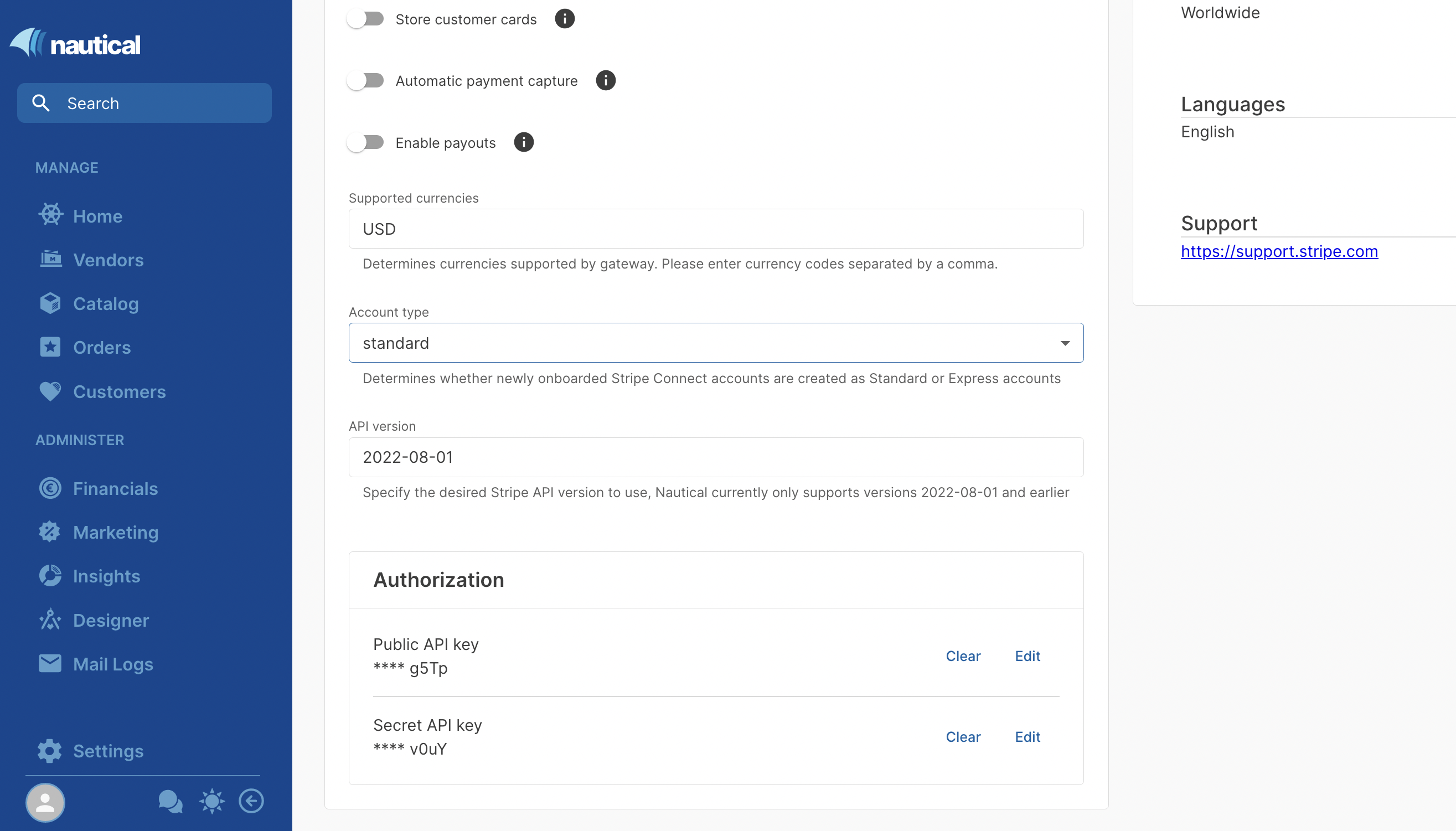
You can now specify the Stripe API version in your Stripe app settings. The API version defaults to 2022-08-01, which is the latest supported version.
fulfilledByMarketplace field remains enabled after disabling it with the updateSellerSettings mutation strict_product_image_handling. Contact Nautical support to request this setting. minimal_variant_price_amount field returned the previous price in the webhook payload instead of the updated value.