: Staging
: Production
✨ New
Backorders
Added the ability to allow buyers to purchase out-of-stock items through the backorders feature, providing more flexible inventory management.
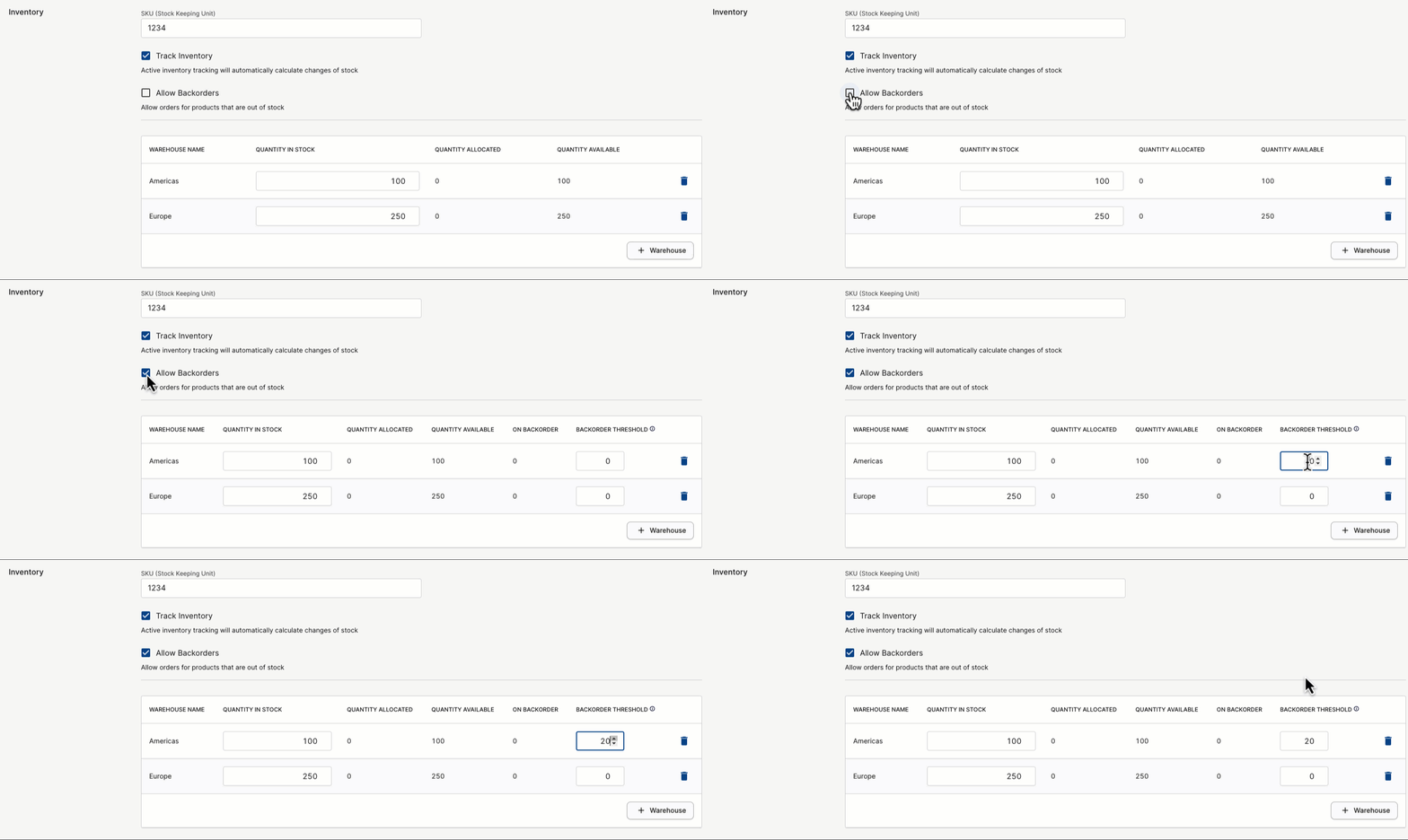
By default, backorders are disabled. A new "Allow vendors to enable backorders" marketplace configuration toggle has been introduced to turn this feature on. Once enabled, the "Allow backorders" checkbox is appears on products and product variants, which allows sellers to choose whether their products can be backordered.
When backorders are enabled for a product or variant, you can set a "Backorder Threshold" when managing inventory. This specifies the maximum number of units that can be backordered when a variant is out of stock.
Add voucher to draft order
Marketplace operators now have the ability to apply voucher promo codes directly to draft orders. An "Apply Voucher" button has been introduced on the MP Draft Order page, making it possible to add promo codes during the draft stage.
Voucher column on order list page
The "Voucher Code" column now appears on the Orders list page. This column will display the voucher code associated with each order, if applicable.
Password reset for customer account
Added a "Reset Password" button to the Customer Details page. Marketplace operators can use this button to sent a password reset email to the customer.
💎 Changed
Improved error handling for products
Notifications now appear at the top of the page if a category or product type is missing, making it easier to identify and fix missing information during product management.
Use marketplace timezone in analytics charts
Extended the use of the marketplace's timezone setting to include analytics charts on the homepage.
🪲 Fixed
Fixed an issue where seller staff members who did not have the manage_payouts permission were unable to view the My Vendor page.
Fixed an issue that incorrectly displayed the "Decline Fulfillment" button on fully paid seller orders, where declining fulfillments is not permitted.
Fixed an issue where adding attribute values with the Variant Creation wizard resulted in an error.
✨ New
Purchase Order field
Added the "Purchase Order" field to the Draft, Quote, and Marketplace Order Details pages, allowing marketplace operators to add purchase order numbers. This includes the ability to search orders by purchase order number(s). Currently, you can only edit this field on draft or quote orders in the Dashboard. The ability to edit this field from a marketplace order will be in an upcoming release.
💎 Changed
Features moved under app marketplace
The "Apps > Features" tab has been removed and each feature plugin has been moved under the main "Apps" tab.
🪲 Fixed
Fixed the "Reset Password" button on Customer pages to generate links to the "Customer password reset URL" as configured in Settings -> Site Settings.
Fixed an issue that caused a Cannot assign to read only property '0' of object '[object Array]' error message to appear when manually creating payments against marketplace orders.
Fixed an issue that required a page refresh to display newly added product or variant metadata from the Dashboard.